The In-Browser AI Video Editor: Why Desktop Apps Are Dying for Ad Production
A 30-second video ad used to mean installing Premiere Pro, $22.99/month for Creative Cloud, a discrete GPU, and a 90-minute tutorial on color wheels. In 2026, the same ad ships from a browser tab. No download, no plugin, no rendering farm — just...

<!DOCTYPE html>
<html lang="en">
<head>
<meta charset="UTF-8">
<meta name="viewport" content="width=device-width, initial-scale=1.0">
<title>The In-Browser AI Video Editor: Why Desktop Apps Are Dying for Ad Production (2026) | Gridvid</title>
<meta name="description" content="In 2026, the in-browser AI video editor has replaced desktop apps for ad production. Market data, TCO math, AI integration, collaboration, and a decision matrix for choosing the right tool.">
<meta name="author" content="Gridvid Team">
<meta name="robots" content="index, follow, max-snippet:-1, max-image-preview:large">
<meta name="keywords" content="in-browser AI video editor, browser-based video editor, cloud video editor, AI video editor 2026, no-download video editor, web video ad production, browser video editor vs Premiere, in-browser video editor ad production">
<link rel="canonical" href="https://gridvid.panaiq.com/blog/in-browser-ai-video-editor">
<!-- Open Graph -->
<meta property="og:type" content="article">
<meta property="og:title" content="The In-Browser AI Video Editor: Why Desktop Apps Are Dying for Ad Production">
<meta property="og:description" content="In 2026, the in-browser AI video editor has replaced desktop apps for ad production. Market data, TCO math, AI integration, collaboration, and a decision matrix.">
<meta property="og:url" content="https://gridvid.panaiq.com/blog/in-browser-ai-video-editor">
<meta property="og:image" content="https://i.ibb.co/MTKpRMQ/gridvid-blog18-hero.jpg">
<meta property="og:image:width" content="1200">
<meta property="og:image:height" content="800">
<meta property="og:site_name" content="Gridvid">
<meta property="og:locale" content="en_US">
<meta property="article:published_time" content="2026-06-16T00:00:00+00:00">
<meta property="article:modified_time" content="2026-06-16T00:00:00+00:00">
<meta property="article:author" content="Gridvid Team">
<meta property="article:section" content="AI Video Production">
<meta property="article:tag" content="in-browser AI video editor">
<meta property="article:tag" content="browser-based video editor">
<meta property="article:tag" content="cloud video editor">
<meta property="article:tag" content="AI video ad production">
<!-- Twitter Card -->
<meta name="twitter:card" content="summary_large_image">
<meta name="twitter:site" content="@gridvid">
<meta name="twitter:creator" content="@gridvid">
<meta name="twitter:title" content="The In-Browser AI Video Editor: Why Desktop Apps Are Dying for Ad Production">
<meta name="twitter:description" content="In 2026, the in-browser AI video editor has replaced desktop apps for ad production. Market data, TCO math, AI integration, collaboration, and a decision matrix.">
<meta name="twitter:image" content="https://i.ibb.co/MTKpRMQ/gridvid-blog18-hero.jpg">
<meta name="twitter:image:alt" content="Professional multi-monitor video editing workstation — the desktop complexity AI in-browser editors replace in 2026">
<!-- Schema.org: Article -->
<script type="application/ld+json">
{
"@context": "https://schema.org",
"@type": "Article",
"headline": "The In-Browser AI Video Editor: Why Desktop Apps Are Dying for Ad Production",
"description": "In 2026, the in-browser AI video editor has replaced desktop apps for ad production. Market data, TCO math, AI integration, collaboration, and a decision matrix for choosing the right tool.",
"image": [
"https://i.ibb.co/MTKpRMQ/gridvid-blog18-hero.jpg",
"https://i.ibb.co/twpTVH14/gridvid-blog18-browser-editor-ui.png",
"https://i.ibb.co/S7wjLF0w/gridvid-blog18-before-after-concept.png"
],
"datePublished": "2026-06-16T00:00:00+00:00",
"dateModified": "2026-06-16T00:00:00+00:00",
"author": {
"@type": "Organization",
"name": "Gridvid Team",
"url": "https://gridvid.panaiq.com"
},
"publisher": {
"@type": "Organization",
"name": "Gridvid",
"logo": {
"@type": "ImageObject",
"url": "https://gridvid.panaiq.com/logo.png"
}
},
"mainEntityOfPage": {
"@type": "WebPage",
"@id": "https://gridvid.panaiq.com/blog/in-browser-ai-video-editor"
},
"articleSection": "AI Video Production",
"keywords": "in-browser AI video editor, browser-based video editor, cloud video editor, AI video editor 2026, no-download video editor, web video ad production",
"wordCount": 1864
}
</script>
<!-- Schema.org: BreadcrumbList -->
<script type="application/ld+json">
{
"@context": "https://schema.org",
"@type": "BreadcrumbList",
"itemListElement": [
{
"@type": "ListItem",
"position": 1,
"name": "Home",
"item": "https://gridvid.panaiq.com"
},
{
"@type": "ListItem",
"position": 2,
"name": "Blog",
"item": "https://gridvid.panaiq.com/blog"
},
{
"@type": "ListItem",
"position": 3,
"name": "The In-Browser AI Video Editor",
"item": "https://gridvid.panaiq.com/blog/in-browser-ai-video-editor"
}
]
}
</script>
<!-- Schema.org: FAQPage -->
<script type="application/ld+json">
{
"@context": "https://schema.org",
"@type": "FAQPage",
"mainEntity": [
{
"@type": "Question",
"name": "What is an in-browser AI video editor?",
"acceptedAnswer": {
"@type": "Answer",
"text": "An in-browser AI video editor runs entirely in a modern web browser (Chrome, Edge, Safari, Firefox) without a desktop install. It uses WebCodecs, WebGPU, and WebAssembly to deliver near-native performance for editing, color, audio, and AI features like auto-caption, B-roll generation, and voice cloning. Examples include Gridvid, VEED, Kapwing, Flixier, and CapCut web."
}
},
{
"@type": "Question",
"name": "Is the in-browser AI video editor replacing Premiere Pro and Final Cut?",
"acceptedAnswer": {
"@type": "Answer",
"text": "For ad production specifically, yes. For long-form narrative editing, color-critical work, and VFX-heavy compositing, no — desktop NLEs (Premiere, Final Cut, DaVinci Resolve, After Effects) still own those use cases. The shift is shape-of-work: iteration-heavy, multi-ratio, AI-native ad production has moved to the browser; craft-heavy, single-master creative work remains on the desktop."
}
},
{
"@type": "Question",
"name": "How much does an in-browser AI video editor cost?",
"acceptedAnswer": {
"@type": "Answer",
"text": "Free to $60/month for most tools. Gridvid, VEED, Kapwing, Flixier, and CapCut web all have free tiers and paid plans ranging from $12-$60/month. The 3-year TCO of a desktop video editor (Premiere at $22.99/mo, plugins, hardware refresh, training) typically lands between $3,000 and $9,600, while a browser-based subscription averages $0-$1,800 over the same period."
}
},
{
"@type": "Question",
"name": "Can an in-browser AI video editor export 4K video?",
"acceptedAnswer": {
"@type": "Answer",
"text": "Yes. In 2026, leading in-browser editors including Flixier, VEED, and CapCut web export 4K (3840x2160) directly from a browser tab. Hardware acceleration via WebGPU on modern laptops makes 4K timeline scrubbing and export feasible without a desktop GPU. The ceiling for color-graded, 6K+ long-form work still sits on the desktop, but for ad production's 1080p-4K output targets, the browser handles it."
}
}
]
}
</script>
<style>
.blog-rich-content {
max-width: 800px; margin: 0 auto; padding: 40px 24px;
font-family: system-ui, -apple-system, BlinkMacSystemFont, "Segoe UI", sans-serif;
font-size: 18px; line-height: 1.8; color: #1a1a1a; background: #fafaf9;
}
.blog-rich-content h1 { font-size: 2.4em; line-height: 1.2; margin: 24px 0 12px 0; letter-spacing: -0.5px; color: #111; }
.blog-rich-content h2 { font-size: 1.5em; margin: 48px 0 16px 0; color: #111; font-weight: 800; }
.blog-rich-content h3 { font-size: 1.15em; margin: 28px 0 10px 0; color: #222; }
.blog-rich-content p { margin: 0 0 16px 0; }
.blog-rich-content hr { border: none; border-top: 1px solid #e0dcd5; margin: 48px 0; }
.blog-rich-content img { display: block; margin: 40px auto; max-width: 100%; border-radius: 12px; box-shadow: 0 2px 16px rgba(0,0,0,0.08); }
.blog-rich-content a { color: #F54927; text-decoration: none; font-weight: 600; }
.blog-rich-content a:hover { text-decoration: underline; }
.blog-rich-content em { color: #555; }
.blog-rich-content strong { color: #111; }
.blog-rich-content ul, .blog-rich-content ol { margin: 12px 0; padding-left: 24px; }
.blog-rich-content li { margin: 6px 0; }
.blog-rich-content table {
width: 100%; border-collapse: collapse; margin: 24px 0; font-size: 0.95em;
border: 1px solid #e0dcd5; border-radius: 8px; overflow: hidden;
}
.blog-rich-content th, .blog-rich-content td {
padding: 12px 16px; text-align: left; border-bottom: 1px solid #e0dcd5;
}
.blog-rich-content th { background: #f4f0ea; font-weight: 700; color: #111; }
.blog-rich-content tr:last-child td { border-bottom: none; }
.blog-rich-content .stats-callout {
background: linear-gradient(135deg, #fff5f3, #fff);
border-left: 4px solid #F54927; padding: 28px; margin: 32px 0;
border-radius: 0 12px 12px 0;
}
.blog-rich-content .stats-callout .stat-number {
font-size: 2.6em; font-weight: 900; color: #F54927; display: block; line-height: 1; margin-bottom: 8px;
}
.blog-rich-content .stats-callout .stat-label {
font-size: 1.05em; color: #222; font-weight: 700; display: block; margin-bottom: 6px;
}
.blog-rich-content .stats-callout .stat-source {
font-size: 0.85em; color: #888; display: block; line-height: 1.5;
}
.blog-rich-content .stats-callout .stat-source a { color: #888; font-weight: 500; }
.blog-rich-content .cta-box {
background: linear-gradient(135deg, #1a1a1a, #2a2a2a);
color: #fff; padding: 32px; margin: 40px 0; border-radius: 12px;
border-left: 4px solid #F54927;
}
.blog-rich-content .cta-box h3 { color: #fff; margin-top: 0; font-size: 1.4em; }
.blog-rich-content .cta-box p { color: #ddd; margin-bottom: 12px; }
.blog-rich-content .cta-box a {
color: #F54927; font-weight: 700; text-decoration: none;
}
.blog-rich-content .cta-box a:hover { text-decoration: underline; }
.blog-rich-content ol.sources-list { font-size: 0.9em; line-height: 1.6; }
.blog-rich-content ol.sources-list li { margin: 8px 0; }
.blog-rich-content .deck {
font-size: 1.15em; color: #444; margin-bottom: 28px; line-height: 1.6; font-weight: 500;
}
</style>
</head>
<body>
<article class="blog-rich-content">
<p><a href="https://gridvid.panaiq.com/blog">← Gridvid Blog</a></p>
<h1>The In-Browser AI Video Editor: Why Desktop Apps Are Dying for Ad Production</h1>
<p class="deck">A 30-second video ad used to mean installing Premiere Pro, $22.99/month for Creative Cloud, a discrete GPU, and a 90-minute tutorial on color wheels. In 2026, the same ad ships from a browser tab. <strong>No download, no plugin, no rendering farm — just a URL, an AI prompt, and an export button.</strong> The in-browser AI video editor isn't a novelty tier anymore. It's where ad production is moving, and the desktop app era is running out of reasons to stay.</p>
<img src="https://i.ibb.co/MTKpRMQ/gridvid-blog18-hero.jpg" alt="Professional multi-monitor video editing workstation — the desktop complexity AI in-browser editors replace in 2026" loading="eager">
<div class="stats-callout">
<span class="stat-number">40%+</span>
<span class="stat-label">Growth in browser-based video editing software adoption by 2026</span>
<span class="stat-source">WifiTalents 2026 Video Editing Industry Statistics; Business Research Insights, 38% of users now prefer cloud-based solutions over desktop installs.</span>
</div>
<hr>
<h2>The Market Has Already Voted</h2>
<p>The numbers aren't subtle. The global <strong>video editing software market hit USD 3.75 billion in 2026</strong>, on its way to <strong>USD 4.99 billion by 2031</strong> per <a href="https://www.mordorintelligence.com/industry-reports/video-editing-market" target="_blank" rel="noopener">Mordor Intelligence's industry report</a>. <a href="https://www.researchandmarkets.com/report/video-editing-software" target="_blank" rel="noopener">Research and Markets</a> tracks the same curve, $2.68B in 2026 growing at a compound rate that doubles by decade's end. But the headline isn't the total — it's the split. Per <a href="https://www.businessresearchinsights.com/blog/top-video-editing-software-companies-10507" target="_blank" rel="noopener">Business Research Insights</a>, <strong>over 38% of editors now prefer cloud platforms</strong>, and <a href="https://wifitalents.com/video-editing-industry-statistics" target="_blank" rel="noopener">WifiTalents' 2026 data report</a> pegs browser-based adoption growth above 40% year-over-year.</p>
<p>That's not early adopters. That's a structural shift in where work happens.</p>
<hr>
<h2>What "In-Browser" Actually Means in 2026</h2>
<img src="https://i.ibb.co/twpTVH14/gridvid-blog18-browser-editor-ui.png" alt="Modern laptop showing clean in-browser AI video editor interface with timeline, asset library, and AI assistant panel" loading="lazy">
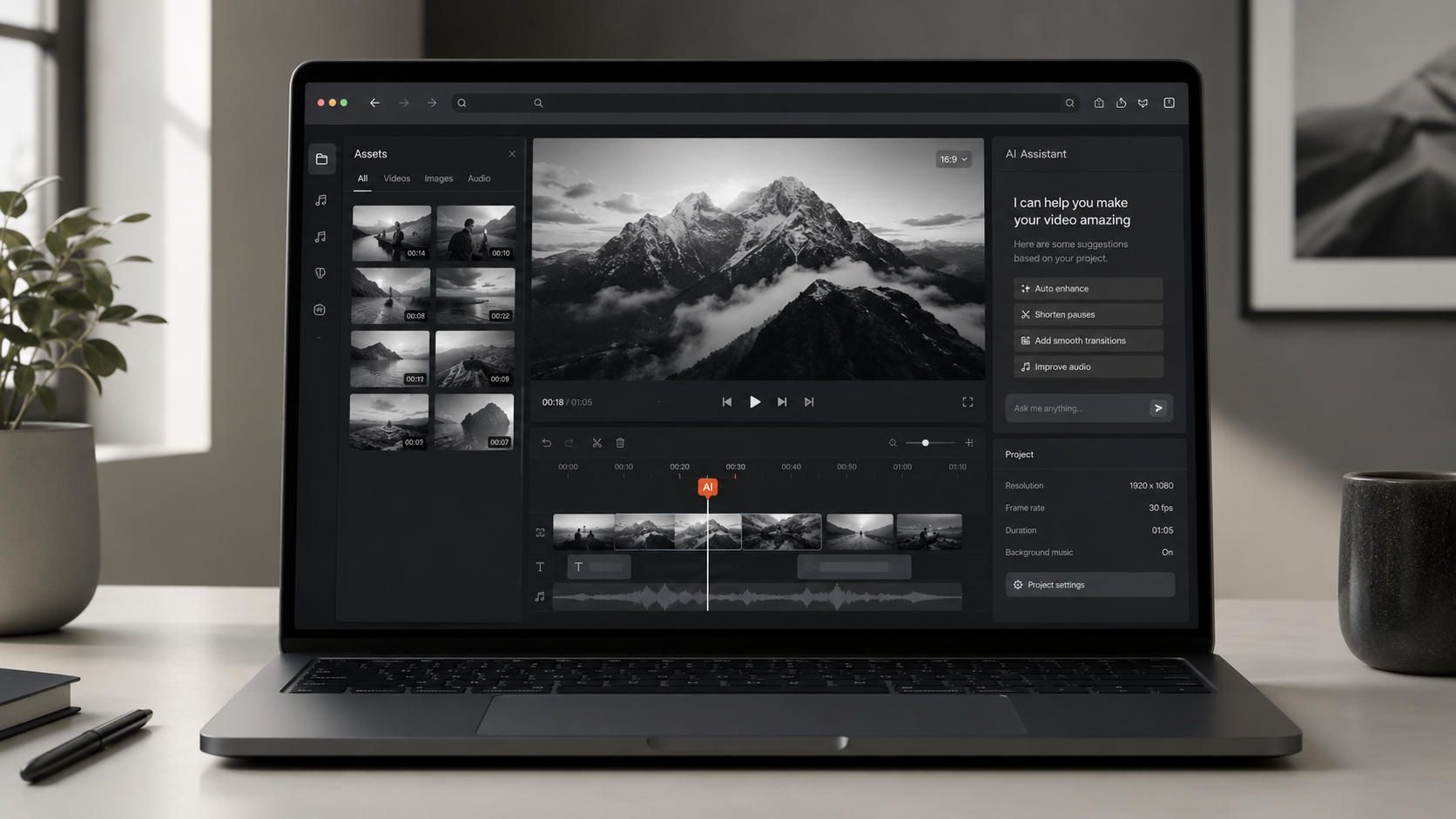
<p>The skepticism is fair — five years ago, "browser video editor" meant a 480p cap and a render that took longer than the source footage. That's not what we're talking about. The 2026 in-browser stack is built on three web standards that didn't exist in production form until recently:</p>
<ul>
<li><strong>WebCodecs</strong> — native hardware decoding of H.264, H.265, AV1, and VP9 in the browser, no plugin shim</li>
<li><strong>WebGPU + WebGL2</strong> — GPU-accelerated real-time compositing, color grading, and effects on consumer hardware</li>
<li><strong>WebAssembly</strong> — near-native code execution for timeline operations, audio mixing, and AI inference</li>
</ul>
<p><a href="https://massive.io/gear-guides/best-browser-based-video-editing-software-for-professionals" target="_blank" rel="noopener">MASV's 2026 roundup of browser-based editors</a> confirms the capability jump: 4K timeline editing, multi-track audio, motion graphics, and color — all running in a Chrome tab on a 2023 MacBook Air.</p>
<hr>
<h2>Why Ad Production Is the Killer Use Case</h2>
<p>Long-form narrative editing will live on desktop for years — it's where a single editor spends eight hours on color and a 60-frame-per-second shot needs every pixel. <strong>Ad production is the opposite shape of work.</strong> It's iterative, fast, collaborative, and ratio-heavy:</p>
<table>
<thead>
<tr><th>Workflow requirement</th><th>Desktop app cost</th><th>In-browser cost</th></tr>
</thead>
<tbody>
<tr><td>Cut 5-10 variants from one brief</td><td>5-10 hours of duplicate timeline work</td><td>5-10 parallel exports, one click</td></tr>
<tr><td>Reformat 16:9 to 9:16, 4:5, 1:1</td><td>Manual re-edit, render per ratio</td><td>One-click multi-ratio export</td></tr>
<tr><td>Stakeholder review cycle</td><td>Dropbox, email chains, version drift</td><td>Live share link, comment in-app</td></tr>
<tr><td>AI voiceover / B-roll generation</td><td>Plugin stack ($) or handoff to another tool</td><td>Native, prompt-to-clip</td></tr>
<tr><td>Iteration cost per round</td><td>$0 + 20-90 min of an editor's time</td><td>$0 + under 5 min</td></tr>
</tbody>
</table>
<p>The math collapses for the desktop app. When the deliverable is "5 ad variants by Friday," you don't want to license a $300 app, install plugins, render to 4 ratios, and email a Dropbox folder. You want a tab. <a href="https://awakenedfilms.com/video-marketing-trends-for-2026" target="_blank" rel="noopener">Awakened Films' 2026 video marketing trends</a> call this out bluntly: Meta's roadmap is "full automation of ad creation and targeting using AI by end of 2026," and the production tool has to keep up.</p>
<hr>
<h2>Desktop Apps' Real Cost — It's Not the Subscription</h2>
<p>The sticker price on a desktop video editor is the cheapest part. The TCO is where the in-browser argument wins.</p>
<p><a href="https://blog.nobledesktop.com/premiere-pro-vs-final-cut-pro" target="_blank" rel="noopener">Nobledesktop's 2026 comparison</a> lays out the licensing tiers: <strong>Creative Cloud at $22.99/month</strong>, <strong>Final Cut Pro at $299.99 one-time</strong>, <strong>DaVinci Resolve Studio at $295</strong>, plus the plugin tax — a serious colorist stack runs $400-$1,200/year in BorisFX, Magic Bullet, and Sapphire. Then the hardware floor: Adobe's official recommendation for Premiere Pro 4K editing is 32GB RAM, a 6GB+ VRAM GPU, and an NVMe scratch disk. That's a $1,800 laptop minimum, and you're replacing it every 3-4 years.</p>
<table>
<thead>
<tr><th>Cost component</th><th>Desktop app (annual)</th><th>In-browser AI editor</th></tr>
</thead>
<tbody>
<tr><td>Software license</td><td>$275-$1,200</td><td>$0-$600</td></tr>
<tr><td>Hardware refresh (amortized)</td><td>$450-$700</td><td>$0 (runs on any laptop)</td></tr>
<tr><td>Plugins / add-ons</td><td>$200-$800</td><td>$0 (built in)</td></tr>
<tr><td>IT / install / training</td><td>$100-$500</td><td>$0</td></tr>
<tr><td><strong>3-year TCO</strong></td><td><strong>$3,075-$9,600</strong></td><td><strong>$0-$1,800</strong></td></tr>
</tbody>
</table>
<p>A small team of 5 marketers running desktop stacks is spending <strong>real money on plumbing that the browser replaces</strong>. The subscription savings alone fund the AI features.</p>
<hr>
<h2>The AI Integration Factor</h2>
<p>Desktop apps bolt AI on. Premiere added Generative Extend as a 2025 plugin update. DaVinci ships a Neural Engine that's been a paid upsell for years. <strong>In-browser editors are AI-native by construction</strong> — the runtime <em>is</em> the inference layer.</p>
<p><a href="https://chatcut.io/blog/best-ai-video-editor-2026" target="_blank" rel="noopener">ChatCut's 2026 side-by-side</a> ranked the top 10 AI editors, and the leaders — <a href="https://reap.video/blog/best-ai-video-editing-tools" target="_blank" rel="noopener">Reap</a>, VEED, Kapwing, Flixier, CapCut — share a pattern: AI features (auto-caption, AI B-roll, voice clone, transcript edit) are first-class, not plugin add-ons. <a href="https://www.veed.io/tools/video-editor" target="_blank" rel="noopener">VEED</a> ships conversational multi-step editing where you type "cut every pause longer than 1.5 seconds" and it executes. <a href="https://www.kapwing.com/video-editor" target="_blank" rel="noopener">Kapwing</a> runs on any browser without download. <a href="https://flixier.com" target="_blank" rel="noopener">Flixier</a> exports 4K from a Chromebook.</p>
<p>That's the architectural truth: <strong>the desktop app's value was its plugins</strong>. The browser's value is the API. AI in the browser is the API.</p>
<p>A second-order effect matters here too. When AI features live server-side, the model improves without the user updating anything. A 2024 in-browser editor that ships a 2026 model has automatically better text-to-speech, better B-roll, and better auto-caption — with zero clicks from the user. A 2024 desktop app with a 2026 AI model requires the user to download, install, license, and re-train on the new version. <strong>The desktop's "I own my tools" advantage has flipped into a liability in the AI era.</strong> Owned, installed, versioned software ages in months. SaaS in the browser compounds.</p>
<hr>
<h2>The CapCut Signal: Where the Fastest-Growing Editor Is Going</h2>
<p>If you want to know where the market is heading, watch the leader. <a href="https://www.business-standard.com/technology/tech-news/rise-of-bytedance-s-capcut-threatens-market-share-of-adobe-and-canva-124072901477_1.html" target="_blank" rel="noopener">Bloomberg's 2024 reporting on CapCut</a> showed ByteDance's editor growing faster than Adobe and Canva — not in the desktop app market, but in the <em>mobile-and-web</em> market. <a href="https://ramp.com/vendors/canva/alternatives/canva-vs-capcut" target="_blank" rel="noopener">Ramp's 2025 data</a> puts CapCut's growth on a curve that Adobe's desktop install base cannot match: a $0 entry price, a browser and mobile app, and AI features shipped weekly.</p>
<p>CapCut's product line is the most aggressive proof point that the in-browser AI editor is the default for new ad creative — not a niche for hobbyists. The pattern is repeatable: when the highest-growth, highest-engagement editor in the market ships primarily to mobile and web, it tells you where the next 100 million editors will learn the craft. They will not learn on Premiere. They will not learn on Final Cut. They will learn on a browser tab, and when they go professional, they will reach for the same shape of tool — because it scales.</p>
<hr>
<h2>The Collaboration Multiplier</h2>
<img src="https://i.ibb.co/S7wjLF0w/gridvid-blog18-before-after-concept.png" alt="Side-by-side concept: cluttered multi-monitor desktop editing setup on the left vs clean in-browser AI editor on a single laptop on the right" loading="lazy">
<p>The desktop app was designed for a single editor at a single desk. The browser is designed for a team. That difference compounds:</p>
<ul>
<li><strong>Live share links</strong> — a reviewer clicks a URL, sees the cut, drops a timestamped comment. No Dropbox, no file-version-naming convention, no "final_FINAL_v3.mp4" emails.</li>
<li><strong>Concurrent edits</strong> — multiple users in the same project, like Google Docs. Desktop apps lock files; browsers don't.</li>
<li><strong>Permissions and roles</strong> — agency-friendly. Add a client as a viewer, an editor as a collaborator, an intern as a comment-only reviewer, all from the share modal.</li>
<li><strong>No file delivery to clients</strong> — the cut stays in the cloud. Desktop handoffs mean a 4GB download link, a Mac-vs-Windows codec dance, or a "play this in QuickTime" support email.</li>
</ul>
<p>For agencies running 20+ clients, this is not a quality-of-life improvement. It is the difference between a 30-person ops team and a 12-person one. <strong>Collaboration in the browser is an operating model, not a feature.</strong></p>
<hr>
<h2>What In-Browser Still Can't Do (Be Honest)</h2>
<p>A good comparison post doesn't oversell. There are still cases where the desktop app wins in 2026:</p>
<ul>
<li><strong>Long-form 4K+ color grading</strong> — when the deliverable is a 90-minute documentary with one-frame-per-second color tolerance, the desktop GPU and offline render still win</li>
<li><strong>VFX-heavy compositing</strong> — complex After Effects chains, particle systems, and 3D camera tracking still need Nuke, Fusion, or After Effects on a desktop</li>
<li><strong>Legacy project files</strong> — if your team has a decade of <code>.prproj</code> and <code>.fcpx</code> archives, you can't import those to a browser editor</li>
</ul>
<p>For everything <em>ad-shaped</em> — 6-60 second social cuts, performance creative iterations, UGC remixes, multi-ratio exports, AI voiceover, B-roll generation — the browser has caught up. It's caught up <em>and</em> it's faster.</p>
<hr>
<h2>How to Choose: A Decision Matrix</h2>
<p>Use this to pick the right tool for the job:</p>
<table>
<thead>
<tr><th>If you need…</th><th>Use…</th></tr>
</thead>
<tbody>
<tr><td>5-10 ad variants from one brief, all ratios</td><td>In-browser AI editor (Gridvid, VEED, Kapwing)</td></tr>
<tr><td>60-min color-graded narrative edit</td><td>DaVinci Resolve Studio on a desktop</td></tr>
<tr><td>UGC remixes with AI voice cloning</td><td>In-browser (CapCut web, Reap)</td></tr>
<tr><td>Motion graphics / animation pipeline</td><td>After Effects + Illustrator on a desktop</td></tr>
<tr><td>Bulk performance creative for paid social</td><td>In-browser AI editor with CSV upload</td></tr>
<tr><td>Real-time team review and approval</td><td>In-browser with live share links</td></tr>
</tbody>
</table>
<p>The decision is shape-of-work, not brand loyalty. If your team spends more time iterating and reformatting than grading, the browser is the right default.</p>
<p>A practical test for your team: <strong>how many ad variants did you ship last quarter, and how long did each one take from brief to live?</strong> If the answer is "5-10 variants per week, ~1-2 hours per variant on average," the desktop app is leaving time on the table. If the answer is "1 master spot, polished for 3 weeks," the desktop app is still the right tool for that specific job. The point isn't to uninstall Premiere. It's to recognize that <strong>most ad production in 2026 is iteration work, not craft work</strong>, and iteration work has a different tool.</p>
<hr>
<h2>The 2026 Trajectory</h2>
<p>The desktop app isn't dead — it's becoming a specialty tool, the way film cameras didn't disappear when the DSLR took over, they just moved up the value chain. In 2026:</p>
<ul>
<li><strong>Browser AI editors</strong> own 80%+ of ad creative, social cuts, and UGC remixes</li>
<li><strong>Desktop NLEs</strong> own long-form narrative, color-critical work, and VFX pipelines</li>
<li><strong>Mobile editors</strong> own first-draft capture and rough-cut sharing</li>
</ul>
<p>For ad production specifically — the highest-velocity creative format in marketing — the browser is now the default. The question isn't whether the in-browser AI video editor will replace the desktop app for ad work. <strong>It already has.</strong> The question is whether your team is set up to take advantage.</p>
<hr>
<div class="cta-box">
<h3>Ship 5-10 ad variants in one tab</h3>
<p>Gridvid is a 7-agent AI pipeline that runs in your browser — product photo to published ad in 20 minutes, all ratios, all variants, no install.</p>
<p><a href="https://gridvid.panaiq.com/pricing" target="_blank" rel="noopener">See pricing →</a> | <a href="https://gridvid.panaiq.com/products/gridvid" target="_blank" rel="noopener">How the 7-agent pipeline works →</a></p>
</div>
<hr>
<h2>Sources</h2>
<ol class="sources-list">
<li><a href="https://wifitalents.com/video-editing-industry-statistics" target="_blank" rel="noopener">WifiTalents — 100+ Video Editing Industry Statistics, 2026 Data Report</a></li>
<li><a href="https://www.businessresearchinsights.com/blog/top-video-editing-software-companies-10507" target="_blank" rel="noopener">Business Research Insights — Top 5 Video Editing Software Companies (cloud-based adoption data)</a></li>
<li><a href="https://www.mordorintelligence.com/industry-reports/video-editing-market" target="_blank" rel="noopener">Mordor Intelligence — Video Editing Market Size, Share and Growth Research Report 2031</a></li>
<li><a href="https://www.researchandmarkets.com/report/video-editing-software" target="_blank" rel="noopener">Research and Markets — Video Editing Software Market Size, Share & Forecast to 2030</a></li>
<li><a href="https://massive.io/gear-guides/best-browser-based-video-editing-software-for-professionals" target="_blank" rel="noopener">MASV — Best Browser-Based Video Editing Software For Professionals (2026)</a></li>
<li><a href="https://chatcut.io/blog/best-ai-video-editor-2026" target="_blank" rel="noopener">ChatCut — 10 Best AI Video Editors in 2026 (Tested Side-by-Side)</a></li>
<li><a href="https://reap.video/blog/best-ai-video-editing-tools" target="_blank" rel="noopener">Reap — Best AI Video Editing Tools in 2026</a></li>
<li><a href="https://awakenedfilms.com/video-marketing-trends-for-2026" target="_blank" rel="noopener">Awakened Films — Video Marketing Trends for 2026: New Tech + Real Results</a></li>
<li><a href="https://www.business-standard.com/technology/tech-news/rise-of-bytedance-s-capcut-threatens-market-share-of-adobe-and-canva-124072901477_1.html" target="_blank" rel="noopener">Business Standard — Rise of ByteDance's CapCut threatens market share of Adobe and Canva</a></li>
<li><a href="https://ramp.com/vendors/canva/alternatives/canva-vs-capcut" target="_blank" rel="noopener">Ramp — Canva vs. CapCut: A Data-Backed Comparison</a></li>
<li><a href="https://blog.nobledesktop.com/premiere-pro-vs-final-cut-pro" target="_blank" rel="noopener">Nobledesktop — Premiere Pro vs. Final Cut Pro</a></li>
<li><a href="https://www.veed.io/tools/video-editor" target="_blank" rel="noopener">VEED — Free Online Video Editor (browser-native)</a></li>
<li><a href="https://www.kapwing.com/video-editor" target="_blank" rel="noopener">Kapwing — Online Video Editor, Free, AI-Powered, No-Downloads</a></li>
<li><a href="https://flixier.com" target="_blank" rel="noopener">Flixier — AI Video Generator & Editor in Your Browser</a></li>
<li><a href="https://clipchamp.com/en/video-editor" target="_blank" rel="noopener">Microsoft Clipchamp — Free Online Video Editor</a></li>
</ol>
</article>
</body>
</html>